 Yours to keep
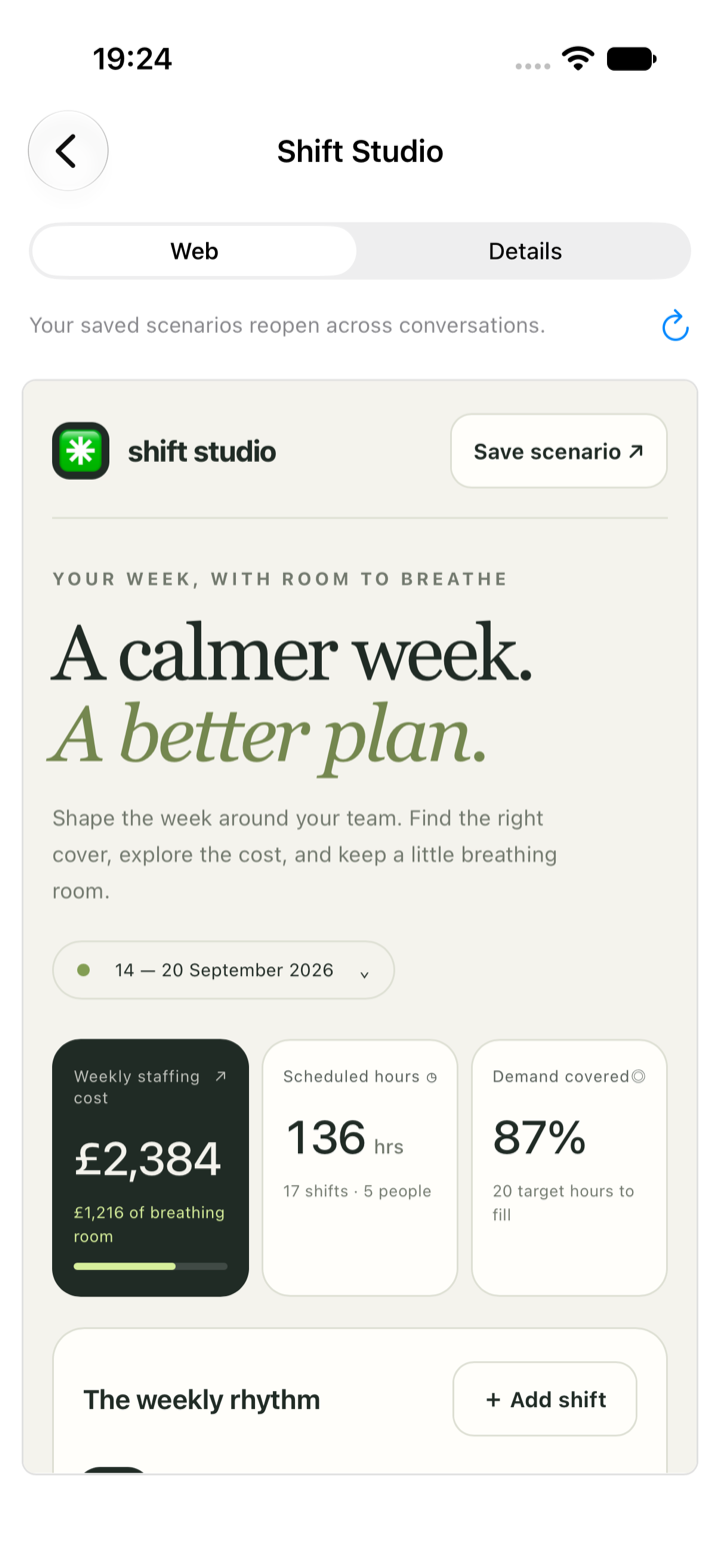
Shift planner. Made with Claude Code, opened today with Codex.
Yours to keep
Shift planner. Made with Claude Code, opened today with Codex.
One way of working
One list of conversations, one way to say yes, one kind of notification, whichever agent is doing the work. Several can run at once, and Trainyard keeps them out of each other's way.
For iPhone and Mac
Claude Code, Codex, Antigravity and Kimi, side by side on your own Mac and in your pocket. Change between them with a tap. What they make for you belongs to you, not to whichever AI made it.
Works with the agents you already use, on the Mac you already own. Building an app yourself? The same tools come as an SDK.
Independent by design
Every AI company has an app for its own agent. Ripul is the one app for all of them, and it is on your side of the table: the best agent changes from month to month, and you should be able to follow it without starting again.
Learn moreOne list of conversations, one way to say yes, one kind of notification, whichever agent is doing the work. Several can run at once, and Trainyard keeps them out of each other's way.
In the middle of a conversation, without losing your place. Choosing an agent becomes a question of which is best at today's job, not which app to open.
Plans, the things you have told them to remember and the tools they build live with your account. What one agent made yesterday, another can pick up tomorrow.
Yours to keep
A calculator for your quotes. A planner for next week's shifts. A small app your team keeps asking for. What an agent makes is saved to your account, opens on every device you own, and can be shared with the people who need it.
It does not disappear into one company's chat history. This one was made in a conversation and opened on a phone.
Watch one tool move from Claude to Codex Browse the libraryTrainyard
Agents are cheap to start. What they work on is not: one live website, one phone, a few simulators, a local model that fills the processor by itself. Trainyard, on your Mac, shares those out, so each agent takes its turn and none lands on top of another.
Releases go out one at a time, simulators are lent and given back, and a local model is not asked for more than it can do. Watch the whole queue from your phone, and hold everything with a swipe while you try something out.
Learn moreLocal models
If you run models on your own machine with LM Studio, Ripul finds them and lists them beside Claude, Codex and the rest. There is nothing to type in: download a model and it is there.
They work as agents on your project, not only as a chat, and you can use them from your phone while your Mac does the thinking. A model on another machine is one address away.
Learn moreYour Mac, in your pocket
The agents work on a Mac you own, on your real projects. Your phone is the window onto all of it, which is the difference between starting a job on your phone and finishing it there.
The whole machine
Bring one of your Mac's windows to your phone and use it, with a pointer, a keyboard and a shared clipboard. Open or quit an app. Find a file. See what is running.
Those are the moments that used to send you home.
Learn moreSeeing the result
A phone normally shows you the phone version of a website. Ripul shows you the full desktop page, shrunk to fit, so you can check what your customers will see without waiting until you are home.
Learn moreChecking the work
Every project on your Mac, with each change laid out to read: what was altered, line by line, and the conversation that asked for it.
Checking what an agent did is most of the job. Here it is a proper screen, not a wall of chat.
Learn more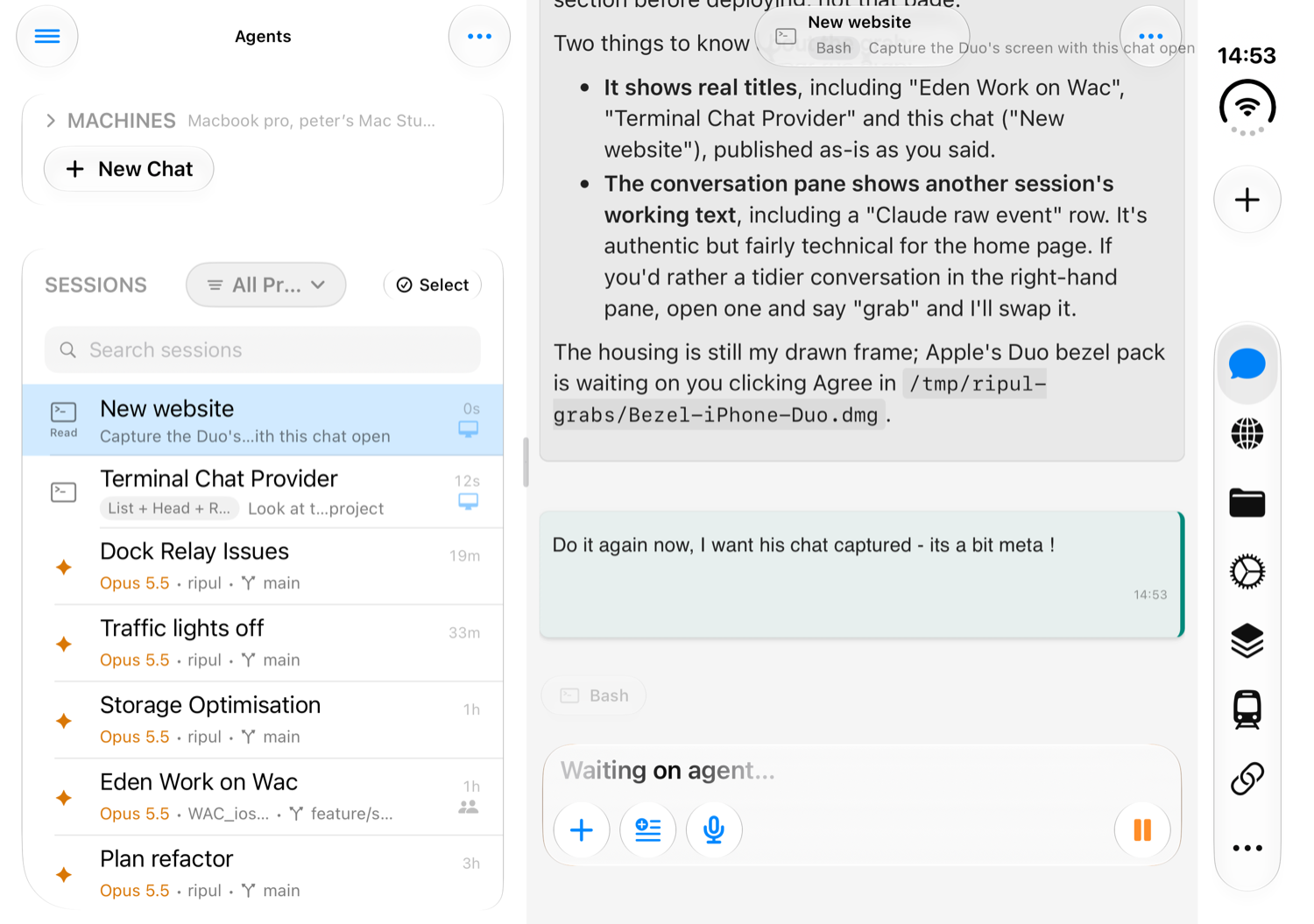
iPhone Duo
Ripul is built for iPhone Duo today. Unfold it, turn it sideways, and your conversations sit beside the one you are working in, with the rest of the app a tap away down the edge.
No hopping back to the list to see which agent needs you. A bigger screen in your pocket is a better desk away from your desk, and Ripul uses all of it.
For developers
Ripul is built with its own SDK, and the SDK is the point. The agent, the voice, the way an agent can see and test an app on a real phone: it is all a Swift package, made for the app you are building.
Your app already knows how to do things. Describe those functions once and your users can ask for them in plain words, or out loud, instead of learning your screens.
And build it the way Ripul is built: with agents that install your app on a real phone, press its buttons, read its logs and check their own work.
See what the SDK gives youFor teams
Most of the work around an agent is people talking: what is wrong, what we want, whether that is right. Ripul puts those people in the same conversation as the agent.
By email, into that one conversation and nothing else. They can reply and direct the agent, not only watch.
Switch to Group and the agent stays quiet until one of you asks it by name. It has read the discussion it sat out, so nobody has to sum up.
Each change is saved alongside the conversation that made it, where the whole team can find it. A teammate can read why something was done, then carry that conversation on themselves.
Day to day
Plans
For anything bigger than a small fix, ask for a plan first. You get to argue with the plan instead of the finished work, which is a much cheaper argument.
Comment on the steps you disagree with, send it back, then watch them get ticked off as they land.
Learn moreApprovals
When an agent wants to do something that matters, it stops and asks. The question arrives on your phone with enough detail to decide there and then.
So put the phone away. It will tell you when it needs you, and a glance at the Lock Screen shows what it is doing right now.
Learn moreVoice
Hold the microphone and talk the way you would to a colleague. Ripul can read the replies back, so a job keeps moving while you walk, drive or cook.
Learn moreWhat it adds up to
Close the laptop and the work used to stop. Now it carries on at home while you get on with your day, and the spare minutes add up.
Ask for the things you have been putting off. Each one gets its own agent, working side by side on your Mac.
One agent has written out how it wants to tackle the job. You disagree with step two, say so, and it has another go.
Your phone buzzes. An agent wants to go ahead with a change. You glance, approve, and put the phone away.
Open the finished page at full desktop size, right there on your phone. Look around. Ask for one more tweak.
Invite a colleague into the conversation. They see everything, add what they know, and the agent takes it from there.
Not because there was no other way to finish.
Privacy
The agents run on a Mac you own. Nothing is copied to somebody else's computer to be worked on. Sign in on both and they find each other; most people never need more. When the work has to stay between your own devices, it can, right down to the model that does the thinking.
Learn moreSign in on both and they find each other. It works from a hotel, a train or a client's guest Wi-Fi, and every part of the app is available.
Your phone talks to your Mac and nothing else is involved. Your files, conversations and screen never touch our servers. It takes some setting up and goes without a few features, so save it for the work that calls for it.
Direct keeps the conversation off our servers. A model you run yourself keeps the thinking away from the AI companies. Use both, and the answer to “where does this go?” is “nowhere”: your phone, your Mac and your model, and nobody else.
You choose for each conversation. The confidential project stays on your machines, and everything else still gets the best model there is.
About local modelsGetting started
One line in Terminal installs it. It sits in the background and does the work.
Use the same account as on your Mac and they find each other. Nothing else to set up.
Pick a project, ask a question you already know the answer to, and watch how it goes about it.
Put Ripul on your Mac today and take the work with you tomorrow.